


Clawdbot AI: The Local-First Assistant That Works Like a 24/7 Digital Employee
TRENDINGJanuary 27, 2026 | by AI Newsroom Editorial Team
In This Article
- Introduction: Why Clawdbot AI Matters
- What Is Clawdbot AI?
- How Clawdbot Works as a Local-First AI Gateway
- How Clawdbot Connects to Big AI Models
- Key Features That Make Clawdbot Feel Like a 24/7 Agent
- Setup Experience: Powerful, But Not Plug-and-Play
- Major Advantages of Clawdbot AI
- Security Risks and Limitations
- How People Are Using Clawdbot Right Now
- What Clawdbot Reveals About the Future of Assistants
- Final Verdict: Who Clawdbot Is (and Isn’t) For
Clawdbot AI is quickly becoming one of the most talked‑about experiments in personal AI. It is not a consumer chatbot you open in a browser tab, and it is not a voice assistant confined to your phone. Instead, it is a full AI assistant and agent system you run yourself, on your own machine, that lives inside the messaging apps you already use every day—WhatsApp, Telegram, Slack, Discord, Signal, iMessage, and more. Reviews describe it as one of the clearest glimpses of what the future of personal AI assistants might actually feel like in practice.
Where cloud‑first assistants like ChatGPT or Siri live entirely on someone else’s infrastructure, Clawdbot flips the model. It runs close to you—on your own computer or private server—and can reach deep into your local world: your files, shell, calendar, inbox, and even your browser. That’s why early adopters often say it feels less like chatting with a bot and more like having a “24/7 AI agent employee” quietly working for you in the background, as shown in various YouTube demos.
Under the hood, Clawdbot also echoes ideas from more complex multi‑agent systems in business, where multiple AI agents coordinate across tools and services. Even when you use it as a single assistant, its design borrows concepts from this world of orchestrated, collaborative AI.
This deep dive unpacks what Clawdbot AI is, how it works, why some users are thrilled by its capabilities, and why security experts are also sounding alarms about its power and risk profile.
| Dimension | Clawdbot AI Profile | Readiness |
|---|---|---|
| Target User | Developers, power users, self-hosting enthusiasts | High (For Tinkerers) |
| Everyday Consumers | Requires complex self‑hosting and permissions management | Low |
| Enterprise Deployments | Conceptually aligned with agent-based automation, but no major rollouts yet | Experimental |
| Security Maturity | Powerful, early‑stage, requires careful review and strict permissions | Caution |
What Is Clawdbot AI?
Clawdbot AI is an open‑source, self‑hosted AI assistant and agent framework. In practical terms, that means three things:
- Open‑source – The source code is public, so anyone can inspect it, fork it, or contribute improvements.
- Self‑hosted – Instead of relying on a vendor’s cloud, you run Clawdbot on your own hardware or a private server.
- Assistant + Agent – It can chat conversationally, but it also acts as a task‑performing “agent” that takes real actions on your behalf.
At its core, Clawdbot is a bridge between your conversations and your tools. It connects directly into a long list of messaging platforms—including WhatsApp, Telegram, Slack, Discord, Signal, iMessage (via BlueBubbles), Google Chat, Microsoft Teams, Matrix, Zalo, WebChat, and more—so you interact with it just like you would with any other contact or group member. This “live in your messages” approach is a big part of why reviewers at MacStories describe it as a compelling look at how personal AI might truly integrate into daily life.
Unlike purely cloud‑based assistants, Clawdbot is designed explicitly around:
- User control – You decide how and where it runs.
- Data privacy – Your data can stay on your own machines.
- Deep local access – It can talk to your filesystem, shell, browser, calendar, and other tools directly, if you allow it.
That local‑first, deeply integrated approach aligns with how enterprises are starting to think about autonomous AI agents in business: powerful assistants wired into internal systems, but operating under strict governance and on infrastructure the organization controls.
How Clawdbot Works as a Local-First AI Gateway
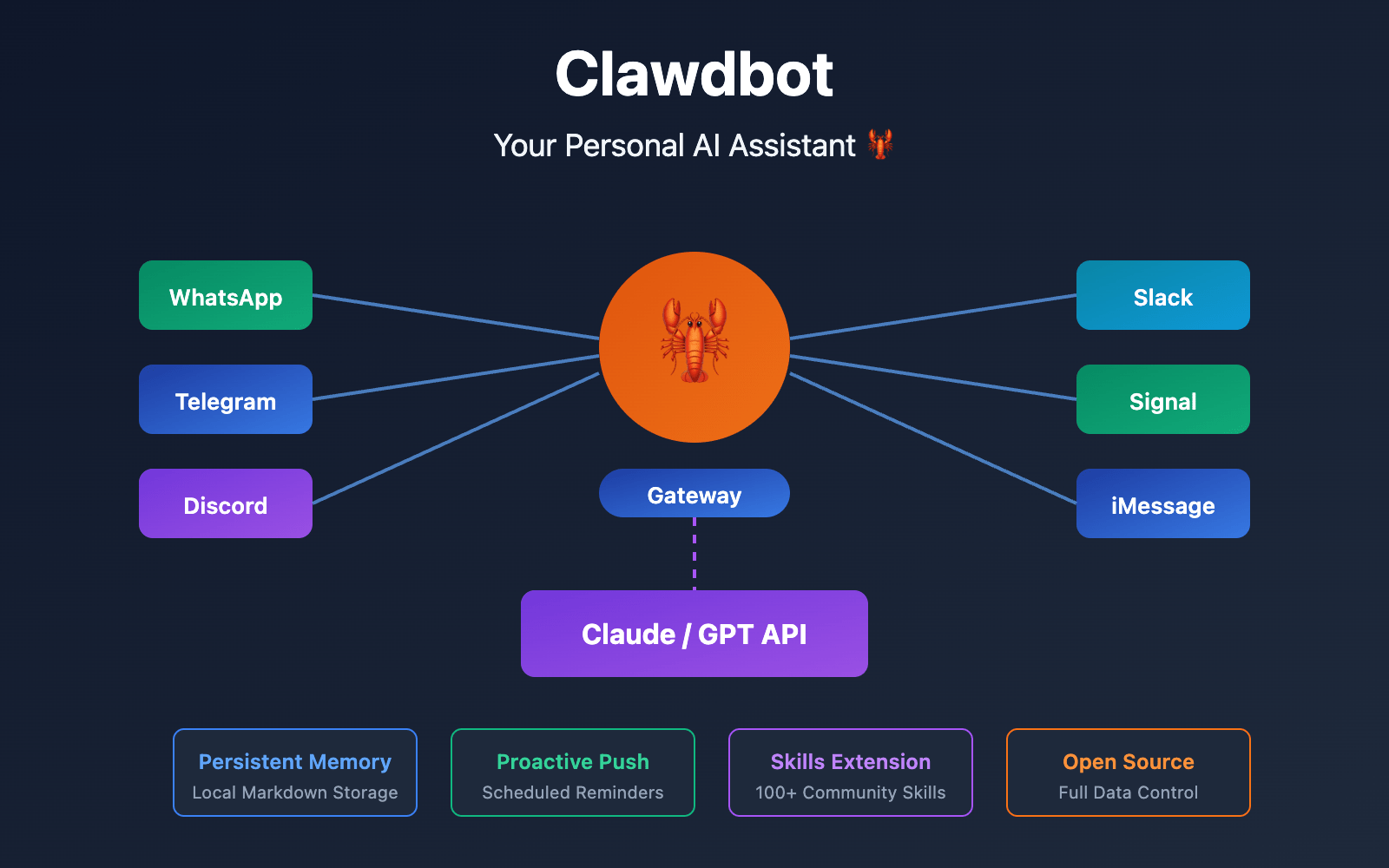
One of Clawdbot’s most important design ideas is that it acts as a local‑first AI gateway. Rather than being a single monolithic model or a simple bot, it is better understood as a control tower that sits at the intersection of:
- You and your chat apps – WhatsApp, Telegram, Slack, Discord, Signal, iMessage via BlueBubbles, and others.
- External AI models – Providers like Anthropic Claude, OpenAI, and Google Gemini.
- Your tools and systems – Files, scripts, browser automation, calendar and email integrations, project tools such as Asana, and more.
From that position, Clawdbot behaves as a central control plane, routing messages, calling out to AI APIs, and invoking local tools, all behind the simple interface of your regular messaging apps. The MacStories deep dive highlights this orchestration layer as one of the most forward‑looking aspects of the project.
For organizations already investing in business AI integration, this control‑plane design will feel familiar. Instead of forcing people into a new, dedicated AI client, Clawdbot pipes intelligent behavior into the apps teams use anyway.
Messaging Without New Apps
Most AI tools today want you to adopt a new product: a custom app, desktop client, or web interface. Clawdbot instead takes an “AI where you are” stance. Once configured, it can:
- Join your WhatsApp group as a participant.
- Live in your Slack workspace as a bot.
- Reply to you on Telegram, Discord, Signal, or Matrix.
- Work with iMessage users via a bridge like BlueBubbles.
You message Clawdbot the same way you message friends or colleagues, and it replies with answers, summaries, or actions taken on your behalf. According to early reviewers, this dramatically lowers friction: there is no separate “AI place” to remember; it’s embedded in your existing conversations.
Long-Term Memory: memory.md and soul.md
A particularly distinctive part of Clawdbot’s architecture is its use of simple, human‑readable files to store memory and define identity:
memory.md– This file holds persistent context: ongoing tasks, key preferences, recurring topics, and important details from past chats. It is how Clawdbot keeps track of what you were working on yesterday or what you asked it to watch.soul.md– This file defines Clawdbot’s “personality” and boundaries: tone of voice, priorities, what it should care about, and what it must not do.
Because these are just markdown files on your system, you can open, read, edit, and version‑control them yourself. The MacStories review emphasizes how unusual this level of transparency is compared to typical cloud assistants, where memory and behavior live in opaque databases you cannot inspect.
In enterprise language, this is very close to how some multi‑agent system architectures define agent profiles and shared memory, only here it’s happening on a single user’s machine with plain text files.
How Clawdbot Connects to Big AI Models
Clawdbot itself is not a large language model. Instead, it’s a router and orchestrator for the LLMs you already have access to. Out of the box, it can connect to:
- Anthropic’s Claude models.
- OpenAI models.
- Google’s Gemini models.
- Other major AI APIs that expose compatible interfaces.
In practice, you bring your own API keys. Clawdbot then:
- Receives messages from your messaging platforms.
- Decides which model or tool is appropriate.
- Calls out to that model via API with the right context.
- Post‑processes the response and sends it back in chat.
This design gives users:
- Cost control – You pay only the underlying model providers; there is no extra SaaS layer just for using Clawdbot. That’s particularly attractive to heavy users who already maintain OpenAI, Anthropic, or Gemini subscriptions.
- Flexibility – You can mix and match models for different tasks, as highlighted in the MacStories overview. Want Claude for analysis, GPT‑4 for coding help, and Gemini for web‑heavy tasks? Clawdbot can orchestrate that.
In many ways, this is exactly what AI automation strategies aim to do at the organizational level: turning a messy collection of tools and models into coherent workflows orchestrated from a central brain.
Key Features That Make Clawdbot Feel Like a “24/7 AI Agent Employee”
Clawdbot goes far beyond typical Q&A chat. Its feature set is designed around actually doing work—continuously, and often proactively. Early users and reviewers consistently describe it with phrases like “agent,” “employee,” and “tinkerer’s laboratory” rather than “chatbot.”
1. Multi-Channel Support Across 13+ Platforms
Clawdbot can be wired into at least 13 major messaging and collaboration platforms, including:
- Telegram
- Slack
- Discord
- Google Chat
- Signal
- iMessage (via BlueBubbles)
- Microsoft Teams
- Matrix
- Zalo
- WebChat
- And other supported channels
This multi‑channel approach means:
- You can ask the same assistant questions from your phone, laptop, or corporate chat.
- It can join group chats as a persistent participant, surfacing summaries, drafts, or task updates.
- It is not locked into any one vendor’s messaging ecosystem.
The MacStories review underscores how unusual this is compared to assistants bound tightly to a single app or platform.
2. Persistent Memory and Proactive Behavior
Most mainstream chatbots treat each conversation as a loosely connected session and quickly forget what came before. Clawdbot is engineered for continuity.
By writing to memory.md and related files, it can:
- Remember long‑running projects and their current status.
- Track preferences, people, and places you mention regularly.
- Carry context across sessions and even across messaging platforms.
But it also goes a step further: Clawdbot is designed to be proactive. According to hands‑on coverage, it can:
- Send unprompted reminders when deadlines approach.
- Deliver daily or weekly briefings summarizing what’s on your plate.
- Alert you about events in your email or calendar that match criteria you’ve given it.
In other words, you don’t always need to ping Clawdbot to get value; it can tap you on the shoulder when something needs attention. That behavior is reminiscent of AI‑driven workflow automation in enterprises, where systems continuously watch event streams and trigger actions without manual intervention.
3. Deep Tool and Automation Capabilities
This is where Clawdbot crosses the line from “assistant” into full “agent” territory. Running on your own hardware, with the permissions you grant it, Clawdbot can:
- Control a browser such as Chrome or Chromium.
- Fill out web forms automatically.
- Read files from your local filesystem.
- Run scripts and commands in your shell.
- Integrate with inbox and calendar tools.
- Automate workflows like:
- Email triage and prioritization.
- Research tasks that span browsing, note‑taking, and summarization.
- Building content outlines—for instance, video outlines using APIs such as Grok, as described in real‑world workflows.
The result is an assistant that doesn’t just tell you what to do but can actually go and do large parts of it on your behalf. That is why YouTube creators often refer to it as a “24/7 AI agent employee” running in the background, rather than a passive question‑answering bot.
In the enterprise world, this is conceptually close to business process automation with autonomous AI agents, where bots are granted structured access to systems like email, CRMs, and internal tools to execute playbooks at scale.
4. Voice, Speech, and Visual “A2UI” Interface
Clawdbot is not limited to text‑only interactions. On platforms like macOS, iOS, and Android, it can:
- Use speech recognition so you can talk to it out loud.
- Reply using text‑to‑speech, via systems such as ElevenLabs, so it responds with a voice instead of a block of text.
It also offers an experimental visual interface described as an “A2UI” live canvas. According to coverage, this real‑time canvas lets the agent manipulate content visually—rearranging or modifying elements as you watch, hinting at more fluid, interactive AI interfaces that go beyond chat bubbles.
5. Extensibility and Custom Skills
Clawdbot is built as a platform, not a closed product. You can extend what it can do through:
- Bundled and managed systems – pre‑packaged skills and tools that come with Clawdbot itself.
- ClawdHub community hub – a community space where developers share add‑ons, skills, and additional integrations, as detailed in the MacStories write‑up.
Existing integrations already include project tools like Asana, and the open‑ended nature of the platform makes it particularly appealing to:
- Developers who want to experiment with new agent behaviors.
- Power users comfortable wiring new scripts and APIs into their assistant.
- Self‑hosting enthusiasts who treat Clawdbot as a personal lab for AI automation.
For teams interested in scaling beyond a single assistant into coordinated swarms of agents, there is a clear conceptual bridge to multi‑agent systems for businesses, where multiple specialized agents collaborate on research, monitoring, scheduling, and more.
6. Flexible Deployment: From Laptop to “Enterprise-Grade” Scale
Finally, Clawdbot’s deployment model is intentionally flexible. You can run it:
- On a local machine at home—a Mac mini, Linux box, or other always‑on system.
- In private cloud containers, for example on platforms like Zeabur.
- On servers designed for higher loads, with architectures that can scale up to what reviewers describe as “enterprise‑grade” levels.
This spread means hobbyists can get started with a single box at home, while advanced users or small teams can deploy it in a private cloud without giving up data control. The MacStories article highlights this as a compelling mix of hacker‑friendly and future‑proof.
Multi‑Channel Presence
Lives in WhatsApp, Telegram, Slack, Discord, Signal, iMessage (via BlueBubbles), Teams, and more.
Deep System Access
Reads files, runs scripts, controls browsers, and connects to inbox and calendars.
Persistent Memory
Uses memory.md and soul.md for long‑term context and editable personality.
Extensible Platform
Supports bundled tools and community skills via ClawdHub for custom workflows.
Setup Experience: Powerful, But Not Plug-and-Play
With all that power comes complexity. Clawdbot offers both a graphical setup wizard and command‑line tools, but it is still clearly aimed at tinkerers rather than casual users.
Typical Setup Flow
According to detailed walkthroughs, getting Clawdbot running generally involves:
- Cloning the GitHub project onto your machine.
- Configuring AI provider API keys via OAuth or other authentication methods.
- Authorizing messaging channels such as Telegram, Slack, Discord, or an iMessage bridge like BlueBubbles.
- Setting user allowlists to control who is permitted to interact with the bot from those channels.
- Granting tool permissions, explicitly defining which folders, scripts, and system commands Clawdbot may access.
- Running health checks to confirm that all integrations and tools are wired up correctly.
Because Clawdbot is self‑hosted and high‑privilege, you are effectively your own DevOps and security team. That means being comfortable with:
- Running shell commands and editing config files.
- Reading documentation to understand what each permission allows.
- Thinking carefully about where you host the system and who can talk to it.
This is precisely why reviewers stress that Clawdbot is not ready for non‑technical users to install blindly. The same caution applies in business contexts, where teams typically start with an AI audit to map risks and permissions before unleashing powerful agents on production systems.
Major Advantages of Clawdbot AI
Despite the learning curve, Clawdbot is attracting enthusiastic attention, especially among developers and power users. Early write‑ups and videos highlight several clear strengths.
1. Data Ownership and Privacy
Because Clawdbot is self‑hosted, you are not funneling your entire digital life into a single vendor’s cloud:
- Your files stay on your own hardware.
- Your conversation logs live in local, human‑readable files like
memory.md. - You decide which directories, services, and accounts the AI can see.
The MacStories review underscores how appealing this is to privacy‑minded users compared to opaque, vendor‑hosted assistants with long data‑retention timelines.
2. Flexibility and Deep Customization
Clawdbot is unusually flexible:
- Multi‑platform – It speaks across many chat and collaboration apps.
- Persistent – It supports always‑on automations, not just one‑off queries.
- Extensible – You can bolt on new tools, skills, and external services.
You can tune its behavior in multiple ways:
- Edit
soul.mdto change its personality, tone, and boundaries. - Adjust or create skills and scripts to modify what it can do.
- Configure which models are used for which kinds of tasks.
Reviewers call it a “tinkerer’s laboratory” for personal AI, emphasizing how much room there is to experiment compared to closed tools described in the MacStories overview.
3. Cost-Effective Use of Existing AI Plans
Clawdbot itself does not charge a subscription. Instead:
- You plug in the AI APIs you already pay for (OpenAI, Anthropic, Gemini, etc.).
- Clawdbot acts as the orchestration layer, adding memory, chat integrations, voice, and tools on top of those APIs.
For heavy AI users, this can be a more economical path than paying for yet another hosted SaaS assistant. You’re effectively upgrading the value of subscriptions you already have, a point highlighted in coverage of real‑world usage.
4. Always-On Agent, Not Just a Chatbot
Most assistants today behave like highly capable calculators: they wait for you to ask something, then compute a response. Clawdbot is architected as an always‑on agent:
- It can keep scripts and tasks running in the background.
- It can take actions—opening sites, sorting email, updating documents—rather than just advising.
- It can continue progressing through task lists even when you’re not actively chatting with it.
That is why multiple YouTube walkthroughs show Clawdbot plowing through job‑sized workloads, acting more like a digital coworker than a tool. For people who’ve been waiting for “real” AI agents, this is one of the closest practical examples available today.
On the business side, similar always‑on agents are already being used to transform business process automation, particularly in back‑office domains like finance, operations, and support.
Security Risks and Limitations
All of this capability comes with meaningful risk. Security‑oriented reviewers and researchers are increasingly vocal about the potential downsides of tools like Clawdbot, especially when misconfigured or used without a strong mental model of what they can do.
1. Security Risks from Deep System Access
To be so useful, Clawdbot often needs broad and sensitive permissions:
- Access to the filesystem, including personal documents.
- Read/write access to messages and email.
- Permission to run shell commands and scripts.
- Potential control over browsers and other applications.
In many setups, this adds up to almost “root‑like” privileges. If anything goes wrong—a bug in Clawdbot, a misconfigured permission, or a malicious prompt injection attack—the assistant could:
- Delete or corrupt files.
- Exfiltrate sensitive data.
- Run dangerous commands on your machine.
Security‑conscious reviewers strongly recommend reading the code and permissions carefully before deploying Clawdbot, and thinking hard about what level of system access is truly necessary.
The same questions show up in discussions of ethical and compliance considerations for autonomous decision‑making, particularly around who is responsible when an AI agent misuses its powers.
2. Resource-Intensive and Early-Stage
Clawdbot is not a polished, mass‑market product. It is still in an early, fast‑moving phase:
- It can be resource‑hungry, depending on your setup and enabled tools.
- It involves many moving parts—models, APIs, message bridges, local tools—that can break or require troubleshooting.
- It is evolving rapidly, which can mean bugs, regressions, and configuration churn.
The MacStories article explicitly notes that while Clawdbot can be impressive, it demands patience and a willingness to experiment. It is a power tool, not an appliance.
3. Complexity for Non-Tinkerers
For a large segment of users, Clawdbot will simply be too complex:
- They may not be comfortable with Git, shell commands, or environment variables.
- They may not fully grasp the implications of granting shell or filesystem access.
- They may not have the time or appetite to debug bridges between multiple chat platforms and APIs.
Experts consistently warn that non‑technical users should not deploy Clawdbot casually. Even for power users, there is a strong recommendation to read documentation and code carefully before letting it near sensitive data, as emphasized in the MacStories review.
4. Potential Vulnerabilities and Safety Concerns
Because Clawdbot is powerful and rising quickly in popularity, security observers also worry about:
- Undiscovered vulnerabilities in the codebase.
- Prompt injection attacks, where malicious web pages or documents trick the agent into performing harmful actions.
- The general risk surface created when LLM outputs are wired directly to high‑privilege tools.
Analyses around Clawdbot stress that rapid adoption must be matched by serious safety scrutiny. It may be an early exemplar of what the future of agents looks like, but it is also a critical test of how we secure that future.
“Powerful AI agents like Clawdbot force us to confront uncomfortable questions about control and responsibility. The more we let them act on our behalf, the more rigor we need around how they’re designed, configured, and supervised.”
Those are the same questions being asked about the future of autonomous AI agents in business, where missteps can carry regulatory and financial consequences.
How People Are Using Clawdbot Right Now
Despite the warnings, Clawdbot has already attracted a passionate user base among developers and advanced users. In certain corners of the AI and open‑source community, it is quickly becoming a reference point for what a true personal AI agent can look like.
A “Tinkerer’s Laboratory” and Glimpse of the Future
Writers and reviewers describe Clawdbot as:
- A “tinkerer’s laboratory” for trying out new workflows and automations.
- The “future of personal AI”, showing what it might look like when everyone has a deeply integrated, customizable assistant that lives on their own hardware.
In practice, it is being used heavily for:
- Deep research workflows – letting the agent browse, gather notes, and assemble outlines or briefings across multiple sources.
- Email and communications handling – sorting and prioritizing messages, surfacing what matters most, and drafting replies for you to approve.
- Content creation support – for instance, planning videos using APIs like Grok to help structure detailed outlines, as outlined in the MacStories coverage.
Multiple YouTube demos show Clawdbot acting exactly like a “24/7 AI agent employee,” slowly and steadily working through long task lists with minimal supervision.
For teams inspired by these individual setups and looking to apply similar patterns across an entire company, there is growing interest in how AI and automation can be combined to re‑engineer end‑to‑end processes, not just individual workflows.
Individuals Over Enterprises (For Now)
At this stage, Clawdbot is predominantly an individual phenomenon:
- Used by solo developers and power users.
- Explored by self‑hosting and open‑source enthusiasts.
- Shared via GitHub repos, documentation, and the ClawdHub community.
There is no clear evidence yet of:
- Large‑scale enterprise rollouts.
- Major companies standardizing on Clawdbot as a core tool.
- Formal vendor support arrangements around it.
Security‑minded commentators repeatedly remind users—especially those experimenting with sensitive data—to treat Clawdbot with care, audit its permissions, and avoid granting unnecessary privileges.
Clawdbot Usage Today
Solo Developers & Makers
Power Users & Self‑Hosters
Deep Research Workflows
Email & Comms Triage
Content & Video Outlines
Experimental Automation Labs
What Clawdbot Reveals About the Future of Assistants
Clawdbot sits at a revealing crossroads in the evolution of AI assistants. On one side are mainstream tools like ChatGPT, Siri, and similar offerings:
- Easy to start using.
- Hosted on polished, vendor‑managed infrastructure.
- Tightly coupled to the provider’s data and product ecosystem.
On the other side is the vision embodied by Clawdbot:
- You own the assistant – It runs on hardware you control, whether at home or in your private cloud.
- You own the data – Files, logs, and memory live under your control, often as plain text files.
- You shape the behavior – Personality and limits are editable and transparent via files like
soul.md. - The assistant truly acts – It can browse, script, sort, file, and organize on your behalf, not only respond in text.
This model surfaces hard but important questions:
- How much autonomy should we give AI agents over our systems?
- How do we defend against mistakes, prompt injection, and misuse when agents can execute commands?
- Who bears responsibility when an agent makes a harmful decision: the user, the tool’s author, or the model provider?
As emphasized in security‑aware coverage, powerful AI agents like Clawdbot demand careful safety design and clear boundaries. At the same time, for many enthusiasts, the benefits of exploring this new territory outweigh the risks—especially when they can contain the experiments on hardware they control.
These same themes are at the center of conversations about the future of autonomous AI agents in business: how to design governance, oversight, and accountability frameworks as agents evolve from passive tools into active digital coworkers.
Final Verdict: Who Clawdbot Is (and Isn’t) For
Clawdbot AI is one of the most ambitious attempts so far to build a real personal AI agent:
- It integrates directly with everyday chat apps like WhatsApp, Telegram, Slack, Discord, Signal, iMessage (via BlueBubbles), Google Chat, Microsoft Teams, Matrix, and more.
- It uses leading models such as Anthropic Claude, OpenAI, and Google Gemini via your own API keys, acting as an orchestration gateway rather than a model itself.
- It remembers you over time through files like
memory.md, and behaves according to a customizable personality defined insoul.md. - It can browse the web, read and write files, run scripts and commands, integrate with your inbox and calendar, and help with complex workflows like research and content planning, as extensively documented in the MacStories deep dive.
It has been widely praised among its target audience as a “tinkerer’s laboratory” and a concrete preview of the “future of personal AI.” In video demos, it convincingly plays the part of a tireless “24/7 AI agent employee” working through tasks long after the user steps away.
At the same time, it comes with serious caveats:
- It often requires root‑like permissions and deep access to your system, which magnifies the stakes of any misconfiguration or security flaw.
- It demands comfort with self‑hosting, command‑line tools, and security hygiene to be deployed safely.
- It is still an early‑stage project that security experts and reviewers repeatedly urge users to handle with caution.
If you are a developer, power user, or self‑hosting enthusiast who loves to tune systems and push AI tools to their limits, Clawdbot may be one of the most thrilling projects available right now. It gives you a hands‑on way to explore what life with a truly integrated, locally‑controlled AI agent could feel like.
If, on the other hand, you want a simple, low‑risk assistant that “just works,” Clawdbot is likely too early—and too powerful—to be the right choice. A cloud‑based chatbot with limited system access will be safer and easier to manage.
Either way, Clawdbot points toward a striking possibility: a near‑future in which your primary AI assistant does not live in someone else’s cloud at all, but on a machine you own—woven into every chat app you use, steadily learning your habits, and quietly taking care of the digital busywork that eats your time.
And for businesses thinking beyond a single assistant to entire ecosystems of cooperating AI agents, the same principles—local control, careful permissions, strong governance—will be essential in any serious effort to integrate AI agents into business safely and at scale.


